You downloaded a Google Takeout archive, found an old Thunderbird backup, or someone sent you a mailbox export. Now you have an .mbox file and double-clicking it does nothing useful. Windows has no built-in program for it, and Microsoft Outlook can't open it either.
The good news: an MBOX file is just your emails stored one after another in a single text file. Once you know which tool reads it, opening it takes a few minutes. This guide covers four methods, from free email clients to a dedicated viewer, and tells you which one suits your situation.
On Windows and happy to install software: Thunderbird with the free ImportExportTools NG add-on
On a Mac: Apple Mail's built-in Import Mailboxes option
Just need a quick peek at a small file: any text editor
Large files, many files, or no email client wanted: an MBOX viewer such as Magic Soft MBOX Converter
01
What Is an MBOX File?
MBOX is one of the oldest email storage formats. Instead of saving each message as its own file, it writes every email in a mailbox into one long text file. Each message starts with a line beginning with "From ", followed by the headers (From, To, Subject, Date) and the body. Attachments are stored inside the same file as encoded text.
That simple design is why so many programs use it. You'll usually get an MBOX file from one of these places:
Mozilla Thunderbird stores each local folder (Inbox, Sent and so on) as an MBOX file without a file extension.
Apple Mail exports mailboxes as an .mbox package, which is a folder containing a file named "mbox".
Google Takeout delivers Gmail exports as .mbox files inside the Takeout/Mail folder of the downloaded archive.
Other clients such as SeaMonkey, Eudora, Postbox, Opera Mail and The Bat! also read or write MBOX.
THUNDERBIRD USERS - Next to each mailbox file you'll see a file with the same name ending in .msf. That is an index Thunderbird uses to load folders faster. It contains no emails, so skip it when opening or converting.
02
Method 1: Open MBOX in Thunderbird (Free, Windows, Mac and Linux)
Thunderbird uses MBOX internally, but it doesn't have a simple "open file" option for one. The free ImportExportTools NG add-on fills that gap.
Install Thunderbird from thunderbird.net. If it asks for an email account, add any account you have; you'll only use the Local Folders area.
Open the menu, choose Add-ons and Themes, search for ImportExportTools NG and click Add to Thunderbird.
In the left sidebar, right-click Local Folders, choose New Folder and name it, for example, "Imported MBOX".
Right-click the new folder, point to ImportExportTools NG and choose Import mbox file.
Select Import directly one or more mbox files, click OK, and pick your file. Your emails appear in the folder once the import finishes.
Good for: a free, full email client view with search. Watch out for: very large Google Takeout files can take a long time to import, so it's safer to import them one at a time.
03
Method 2: Open MBOX in Apple Mail (Free, Mac Only)
If you're on a Mac, you already have an MBOX reader. Apple Mail can import MBOX files from other computers directly:
Open Mail and choose File > Import Mailboxes.
Select Files in mbox format and click Continue.
Choose the folder that contains your MBOX file and follow the prompts.
The emails appear in a new mailbox called Import in the sidebar. You can drag them into other mailboxes and delete the Import mailbox afterwards.
Good for: Mac users who want to read old mail with no extra software. Watch out for: it isn't an option on Windows.
04
Method 3: Look Inside With a Text Editor (Quick Check Only)
Because MBOX is plain text, you can open a small file in Notepad, Notepad++ or any code editor. Rename the copy to .txt if Windows won't let you pick an app, then search for "Subject:" or "From:" to jump between messages.
This works for checking what's in a file before you do anything else with it. It's not a real way to read email, though. HTML messages show up as raw code, attachments appear as long blocks of encoded characters, and files of several gigabytes will freeze most editors.
05
Method 4: Use an MBOX Viewer on Windows (No Email Client Needed)
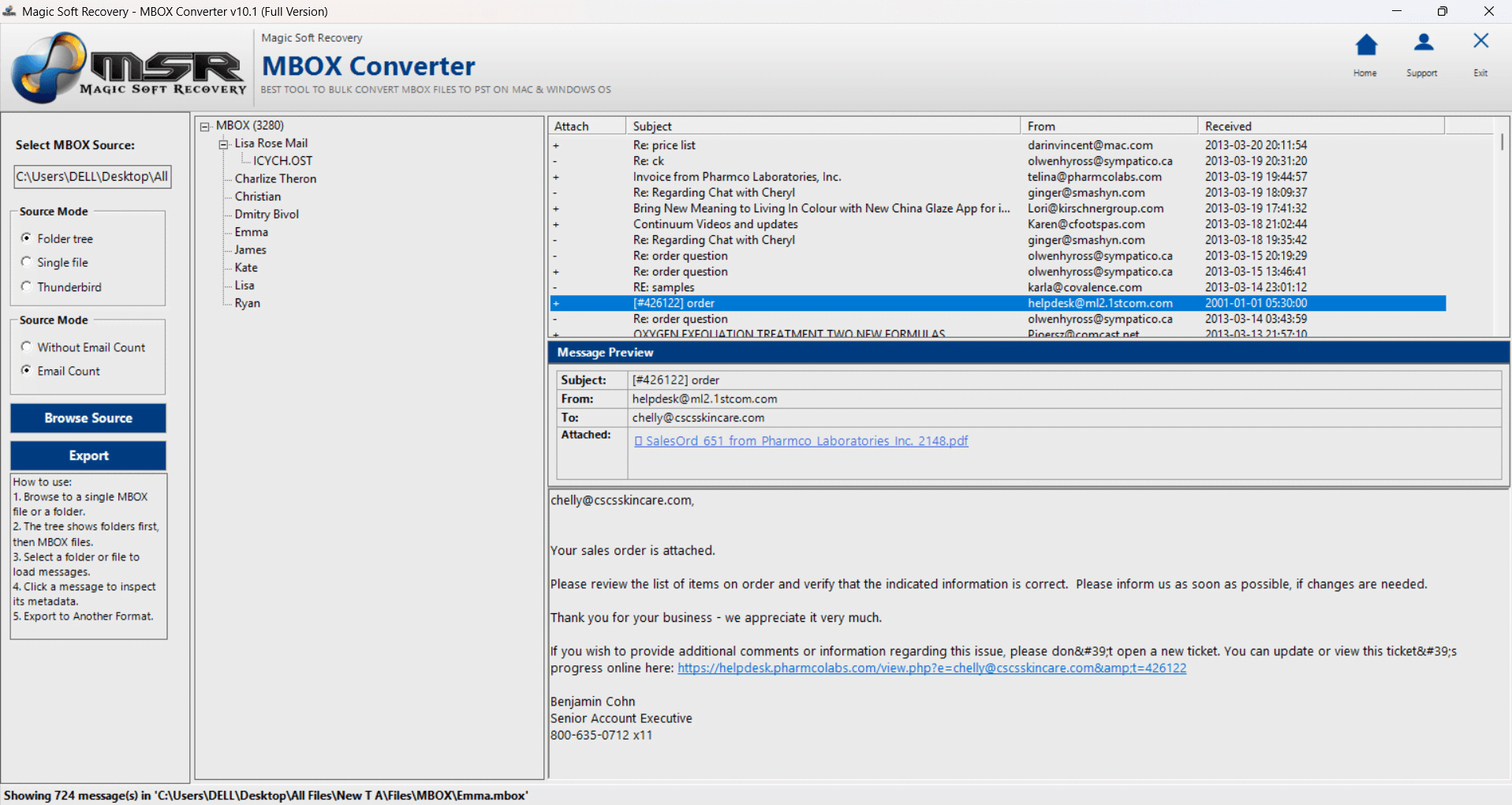
If you don't want to set up Thunderbird, or your files are big or numerous, a dedicated viewer is the fastest route. Magic Soft MBOX Converter opens MBOX files directly on Windows, and its free trial lets you preview every folder, email and attachment with no time limit.
01
Choose a source mode
Pick Single file for one MBOX file, Folder tree for a folder of MBOX files, or Thunderbird to read a Thunderbird profile, then click Browse Source.
02
Browse your folders
The tree shows folders and MBOX files with message counts. Click a folder to load its messages.
03
Read any email
Click a message to see the sender, recipients, attachments and body, just as you would in an email client.
If you later decide you need the emails in another format, the same tool converts MBOX to PST, EML, MSG and PDF. The trial converts the first 10 emails of each MBOX file so you can check the output before buying a license.
06
MBOX Opening Methods Compared
Method
Cost
Platform
Shows attachments
Best for
Thunderbird + ImportExportTools NG
Free
Windows, Mac, Linux
Yes
Reading and searching mail in an email client
Apple Mail import
Free
Mac
Yes
Mac users with a few mailboxes
Text editor
Free
Any
No (encoded text)
Checking a small file's contents
Magic Soft MBOX Converter
Free preview, licenses from $39
Windows
Yes
Large or many files, no email client, converting later
07
Common Problems When Opening MBOX Files
The file has no extension. That's normal for Thunderbird mailboxes. In a file dialog, switch the filter to "All files" so you can select it, or work on a copy renamed with .mbox at the end.
Google Takeout gave me several archives. Large Gmail exports are split across multiple ZIP files. Download and extract all of them, then look in each Takeout/Mail folder.
The file is huge and keeps freezing. Text editors and some email clients struggle with multi-gigabyte files. A dedicated MBOX viewer reads them without loading everything into memory at once.
A Thunderbird folder looks empty or tiny. For IMAP accounts, Thunderbird may only store messages it has downloaded. Check that the folder was synchronized for offline use before you copied it.
Summary
An MBOX file is a mailbox saved as one text file, and you need the right program to read it. Use Apple Mail on a Mac, Thunderbird with ImportExportTools NG if you want a free email client on Windows, and a text editor only for a quick look. If you'd rather skip the email client setup, or you're dealing with large Takeout exports, try the free preview in Magic Soft MBOX Converter.
Moving the mail into Outlook rather than just reading it? Read our step-by-step guide on how to convert MBOX to PST.
Frequently Asked Questions
Frequently Asked Questions
Not directly. Outlook for Windows works with PST files and has no MBOX import option. Convert the MBOX file to PST first, then open the PST in Outlook. Our MBOX to PST guide covers free and automated ways to do it.
Gmail has no option to upload an MBOX file. A common workaround is to open the file in Thunderbird, add your Gmail account to Thunderbird using IMAP, and copy the imported folder into the Gmail account so it syncs.
Online viewers require you to upload your mailbox to someone else's server. For personal or business email, an offline tool that runs on your own computer is the safer choice.
Use Apple Mail: choose File > Import Mailboxes, select "Files in mbox format" and pick the folder that contains the file. Thunderbird with ImportExportTools NG also works on macOS.
Yes. Thunderbird with the ImportExportTools NG add-on is free. The Magic Soft MBOX Converter trial is also free to use as a viewer: it previews every email and attachment with no time limit, and only conversion is limited to 10 emails per file.
About The Author
Magic Soft
Magic Soft provides software solutions for email recovery, data migration, file conversion, and digital data management.