
At Service Since 2015
10+ Years Experience
Open, View and Convert isolate and orphan MSG Files to PST/PDF/EML/MBOX.
Magic Soft MSG Converter is a comprehensive, enterprise-grade utility engineered to open, convert, and migrate Outlook MSG files into diverse file formats and cloud platforms. Designed for seamless batch processing without requiring MS Outlook, it empowers IT administrators, legal professionals, and individual users to extract email messages, attachments, and metadata into PST, MBOX, EML, PDF, and CSV formats while preserving original data integrity.
Magic Soft MSG Converter Full Secured Download Version.
Effortlessly open, convert, and migrate Outlook MSG files with Magic Soft MSG Converter.
Orphaned archives, unreadable attachments, or platform improper email management can pause critical enterprise workflows and forensic investigations in an instant.
MSG is a proprietary Outlook format that often locks valuable communication within isolated desktop environments. Magic Soft MSG Converter seamlessly bridges this gap, allowing you to convert standalone or bulk MSG files into PST, MBOX, EML, and PDF, CSV and VCF formats or migrate them directly to Gmail, Office 365, and Exchange without Outlook dependency.
01Legal, finance, and IT teams frequently perform e-discovery and email auditing to archive critical communication for compliance and legal reporting. Converting isolated MSG files to portable PDF & CSV formats ensures secure, tamper-proof documentation with intact attachments, perfect for court proceedings, offline reviews, and physical printing.
02Converting bulk email archives often risks corrupted formatting, lost attachment links, or missing headers. Built with an advanced processing engine, this tool guarantees complete data integrity—preserving To, From, CC, Date, Inline Images, and UTF-8 Unicode characters across every folder while maintaining original folder hierarchies automatically.
03Easily Open, Convert, and Save Your Outlook MSG Emails in Just a Few Clicks
Easily open old or saved Outlook MSG files without needing MS Outlook installed. Convert single or multiple emails into easy-to-read PDF, EML, or Word documents in seconds.
Smoothly transfer bulk MSG email folders into PST, MBOX, or directly to cloud platforms like Office 365, Gmail, and Exchange while keeping all folder structures intact.
Consolidate backup MSG files into accessible formats like PDF or MBOX to view client messages, track past emails, and keep business communication organized offline.
Safely archive critical email evidence into print-ready PDF and CSV/VCF files with original attachments, exact timestamps, email headers, and complete data safety.
Perform and Switch MSG File Conversion to different file formats.
| File Formats | PST, EML, MBOX, CSV, PDF and VCF portable formats |
| Export Settings | Standard Contacts and Document formats compatible with all Devices and email clients and platforms |
Break down all Outlook MSG file components and convert them with comprehensive field preservation.
Core Message Headers: Instantly transfer all critical email attributes—including From, To, CC, BCC, Subject, and exact Sent/Received timestamps—in a single click.
Inline Images & Formatting: Preserve complete HTML body formatting, inline graphics, embedded hyperlinks, and custom signature styles without distortion.
Attachment Extraction: Safely process and extract all attached documents, images, and archives in their original file format alongside the email body.
Unicode & Character Encoding: Automatically retain international character sets, special symbols, and non-English alphabets using UTF-8 charset standards.
PST Output: Effortlessly combine bulk MSG files into a single or split PST file for instant loading into Microsoft Outlook.
EML & MBOX Export: Convert standalone MSG messages into universal EML or MBOX files compatible with Thunderbird and Apple Mail.
PDF Document Export: Transform emails into secure, print-ready PDF files complete with embedded or external attachment folders.
CSV Address Book & Log: Export contact details and message metadata into clean CSV spreadsheets for fast offline analysis.
Comprehensive features engineered for flawless Outlook MSG email migration on Windows OS.
Seamlessly export standalone or bulk MSG files into widely supported desktop formats including PST, EML, MBOX, PDF, and CSV & VCF. Whether you are archiving historical mailboxes, preparing legal evidence, or moving to a different desktop email client, the software converts your MSG files smoothly without formatting loss.
Operates as a completely standalone Windows application. You do not need Microsoft Outlook installed or configured on your computer system to perform conversions. The software independently reads, parses, and converts configured as well as orphaned MSG files generated by any Outlook edition.
Process thousands of MSG files simultaneously using the "Add File" or "Add Folder" buttons. Built with an optimized Windows processing engine, the tool handles large data stores and heavy email folders effortlessly without system freezing, lags, or message truncation.
Guarantees complete metadata accuracy throughout the migration process. Essential elements such as To, From, CC, BCC, Sent/Received dates, inline images, internet headers, and attachments are maintained exactly in their original state across all output files.
Filter and convert specific MSG files based on custom criteria such as Date Range, Subject, Sender, or Recipient. This selective migration option allows you to isolate exact email threads for e-discovery or compliance without having to convert entire folders.
Designed specifically for Windows environments. The utility runs smoothly on all major 32-bit and 64-bit Microsoft Windows OS versions, including Windows 11, 10, 8.1, 8, 7, and Windows Server editions with zero external software requirements.
Outlook MSG File Converter Tool Specifications
| Edition : | 6.7 |
| Dimensions : | Compact Installation |
| License : | Personal & Technician License |
| Release Date : | 2025 |
| Edition : | Personal & Technician |
| CPU : | Intel 1 GHz Processor (2.4 GHz is recommended) |
| Memory: : | 2 GB (4 GB Recommended) |
| Storage space : | Minimum Disk Space - 200 MB |
| Supported Windows OS : | Windows 11, 10, 8.1, 8, 7 and earlier (32 & 64 Bit). |
| Supported Versions of MSG : | All version of Outlook and Ediscovery MSG Archive Vault. |
| Devices Supported : | All Email client and Documents Application and Spreadsheets |
| Compatible Mac : | Windows Only at the Moment |
The Trial version of MSG Contacts Converter will convert first 10 MSG to PDF and other formats without any preview limit. Once you are satisfied with trial get fully featured to convert unlimited MSG file conversion.
Security tools can scan or briefly pause an application that reads and writes many files. Download the installer only from magicsoftrecovery.com, check that the file is unmodified, and contact [email protected] if your antivirus shows a warning. Keep your antivirus switched on; your IT administrator can approve the program folder if company policy requires it.
The source file should be on the same working system and it is recommended to not use any shared drives or networks (NAS, SAN, LAN and WAN).
If Windows shows a SmartScreen or Defender warning, confirm that you downloaded the installer from magicsoftrecovery.com and contact [email protected]. Keep Windows Security turned on. Your IT administrator can approve the application if your organization requires it.

Step by step technique to convert MSG files to multiple formats easily
Start the specialized Magic Soft MSG Converter as the admin on the system.
Browse your system to select the MSG files or folders you want to convert, then click Load & Analyze.
Review data integrity and folder hierarchy across the preview tabs, select the required files, and proceed with the conversion.
Choose your preferred output format like PST/EML/MBOX/PDF/CSV/VCF, apply the required filters, select the destination path, and click Start Export.
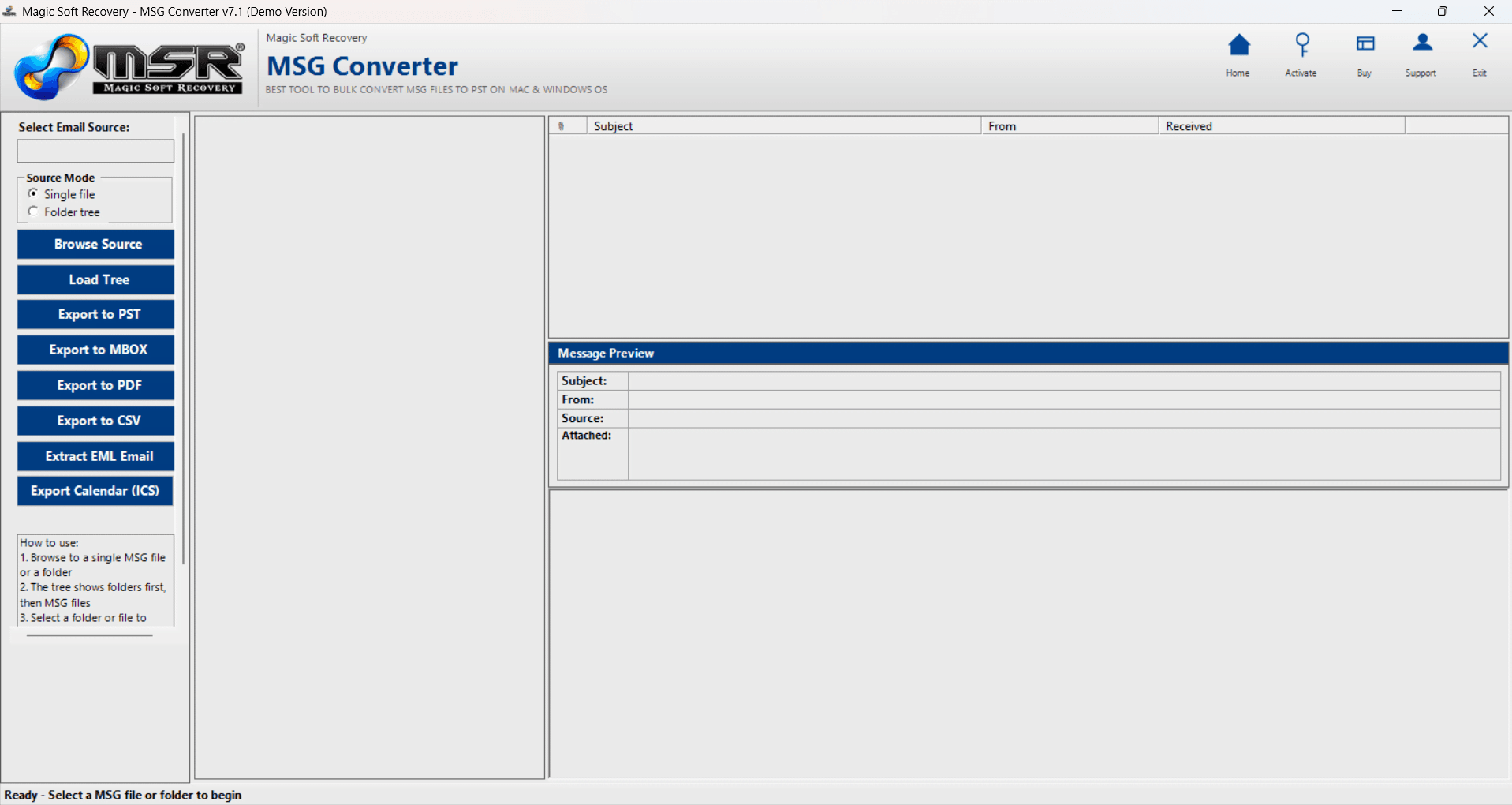
Fully functional trial to test the software against MSG files before final purchase.
| Product Features | Demo Version | Full Version |
|---|---|---|
| How to Convert MSG to EML, PST, MBOX, PDF, VCF and CSV | Limited | Unlimited |
| Add Multiple MSG Files | ✔ | ✔ |
| View MSG Data | ✔ | ✔ |
| Analyze MSG Data | ✔ | ✔ |
| Attachments | ✔ | ✔ |
| Customer Service | Email Only/Live Chat | Priority Assistance 24.7 |
Clear answers to common questions about converting Outlook MSG files on Windows.
No. The Magic Soft MSG Converter is a completely standalone Windows application. You do not need Microsoft Outlook installed or configured on your system to open, view, or convert your MSG files.
You can export your MSG files to multiple popular formats based on your needs. Choose PST to combine messages into Outlook, PDF for easy printing and legal archiving, EML or MBOX for Thunderbird and Apple Mail, or CSV and VCF to extract and back up contact information.
All email attachments are fully preserved in their original file format without any data loss. Depending on your chosen export option (such as PST, EML, MBOX, or PDF), attachments will either remain embedded.
Yes! The tool supports unlimited batch processing. Using the "Add Folder" option, you can load entire directories of MSG files and convert them simultaneously into PST, PDF, EML, or MBOX formats.
When exporting to CSV or VCF, the utility extracts contact properties—including names, email addresses, phone numbers, and company details—from your MSG files and you can have all Attributes of MSG files in output files.
Absolutely. The conversion process is executed entirely on your local Windows PC. As a offline, standalone utility, it requires no cloud or server connectivity and never uploads or logs your private email data.
The software is engineered specifically for Windows and runs smoothly on all 32-bit and 64-bit editions, including Windows 11, Windows 10, Windows 8.1, Windows 7, and Windows Server systems.
Step-by-step installation screenshots
Launch the software and See the product windows.
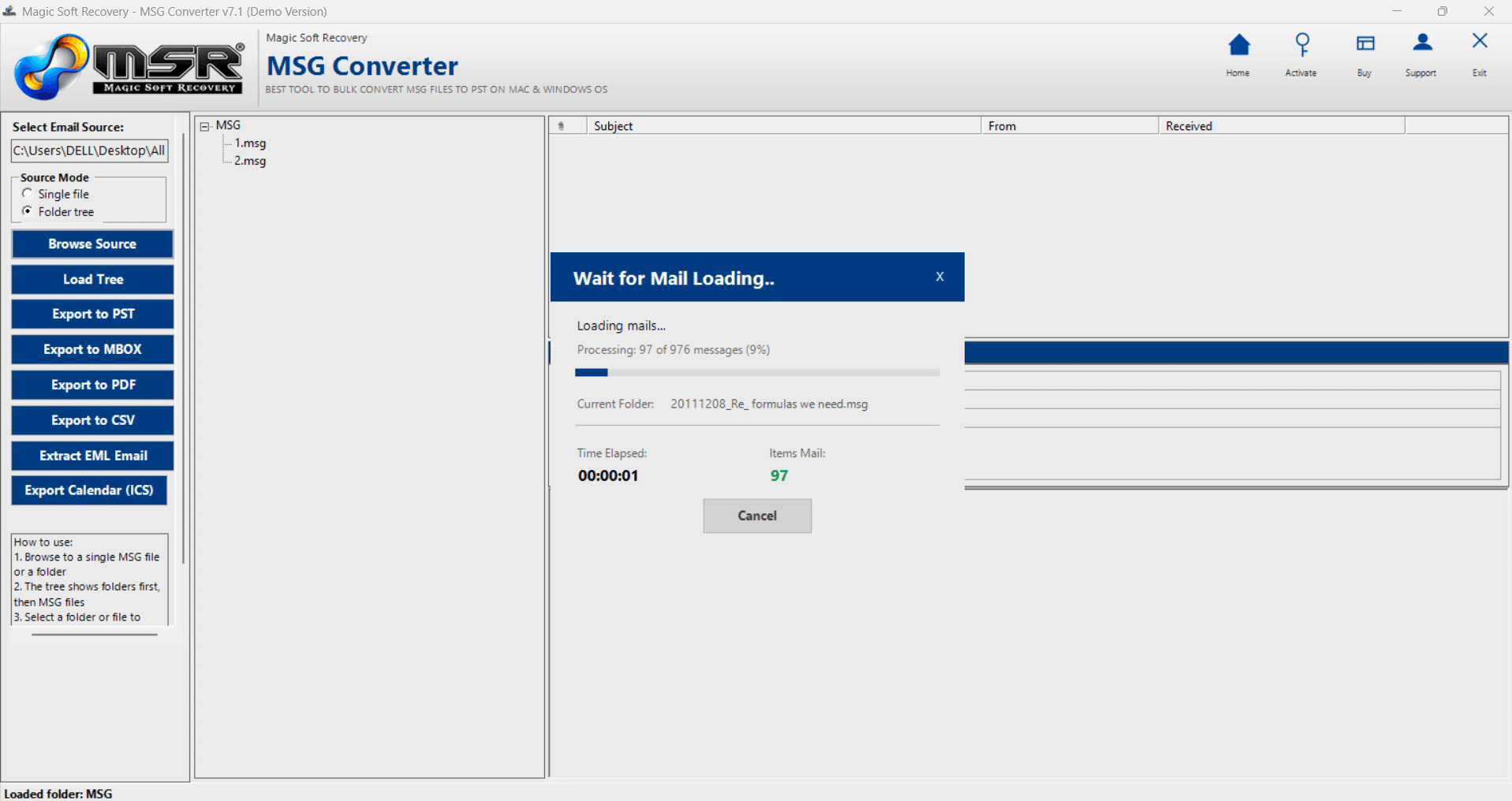
Select Source file as Single MSG/Folder for Bulk
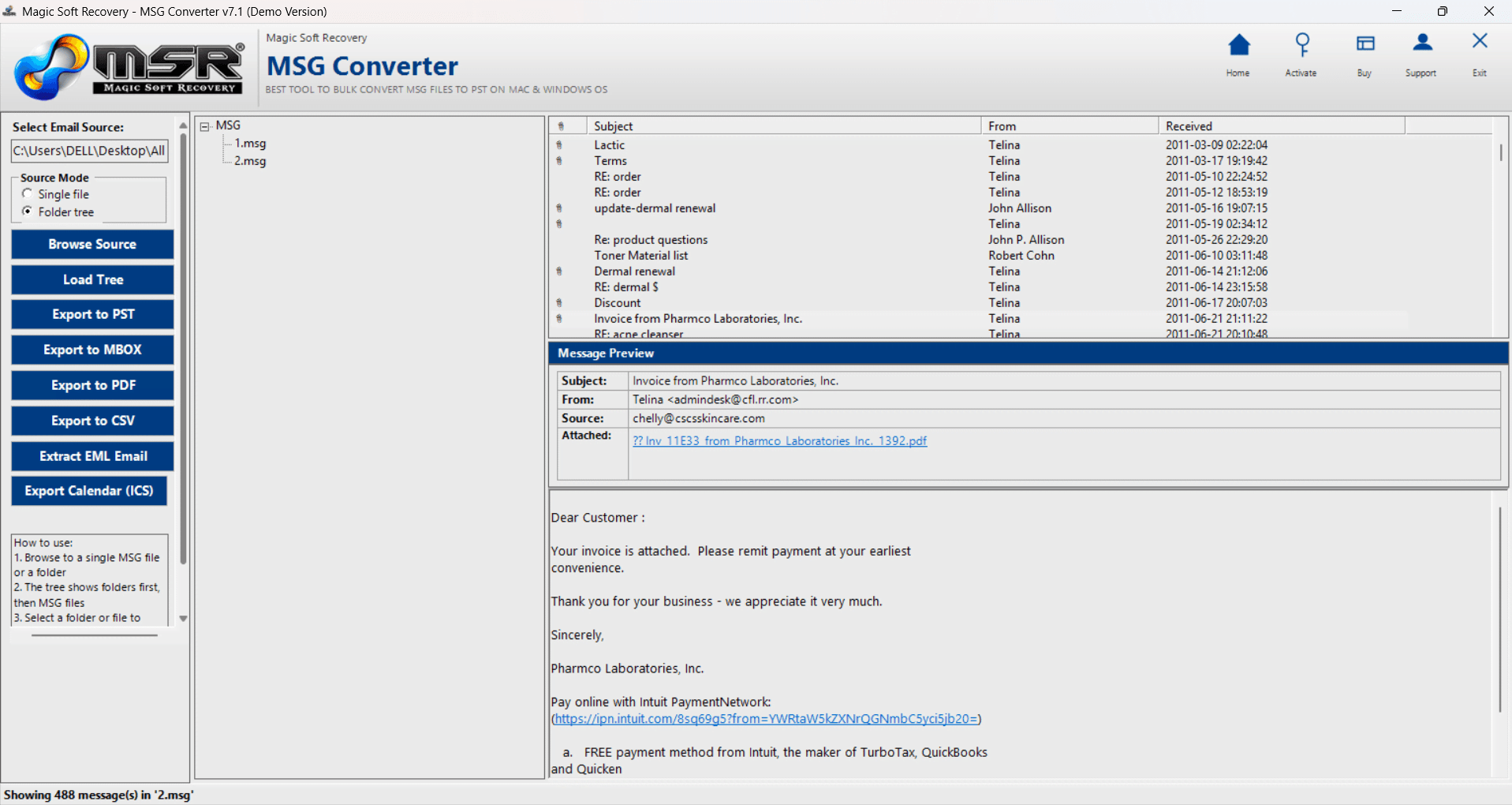
Select any Email to preview the content
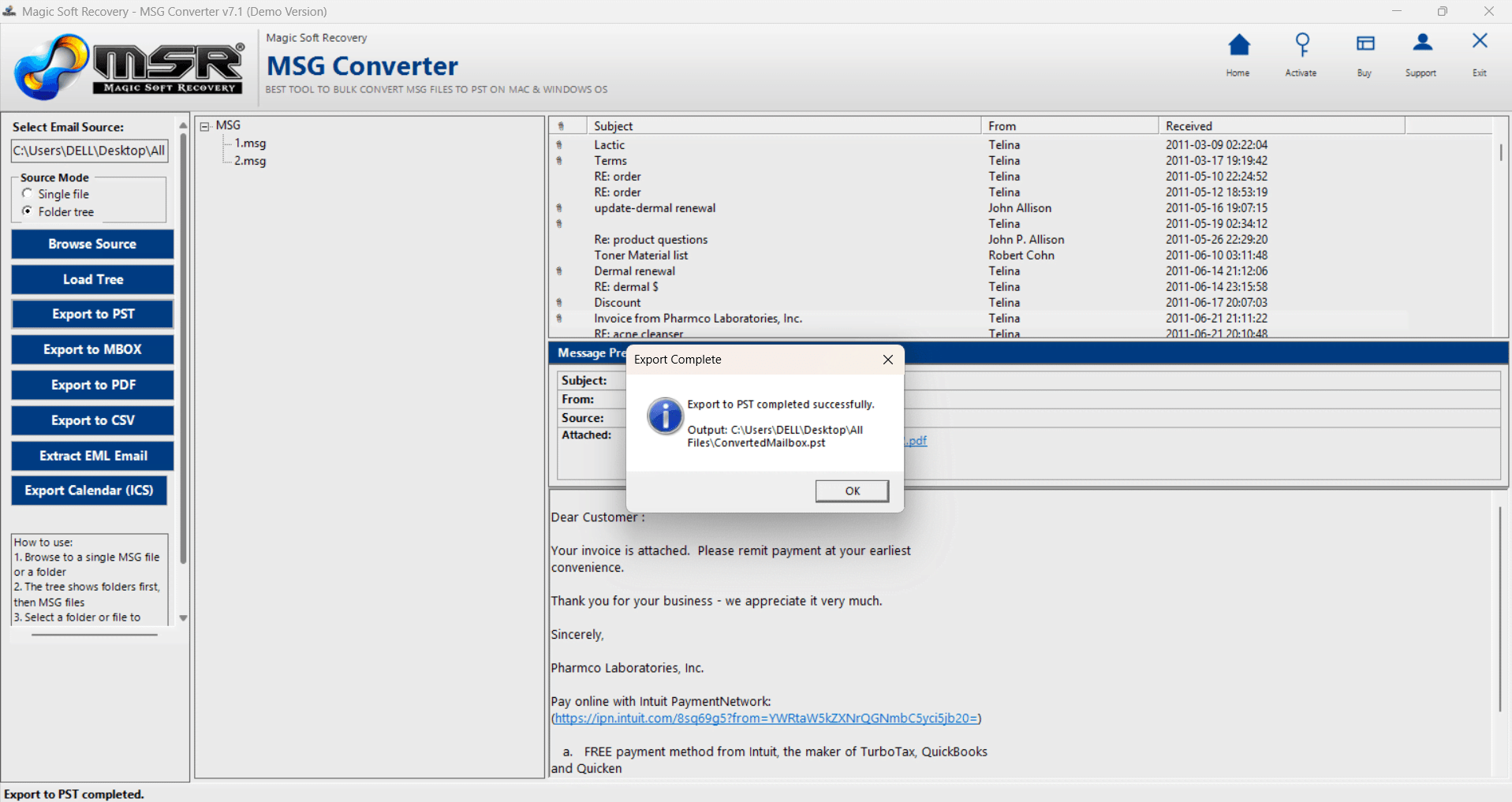
Click on Export button to start Conversion
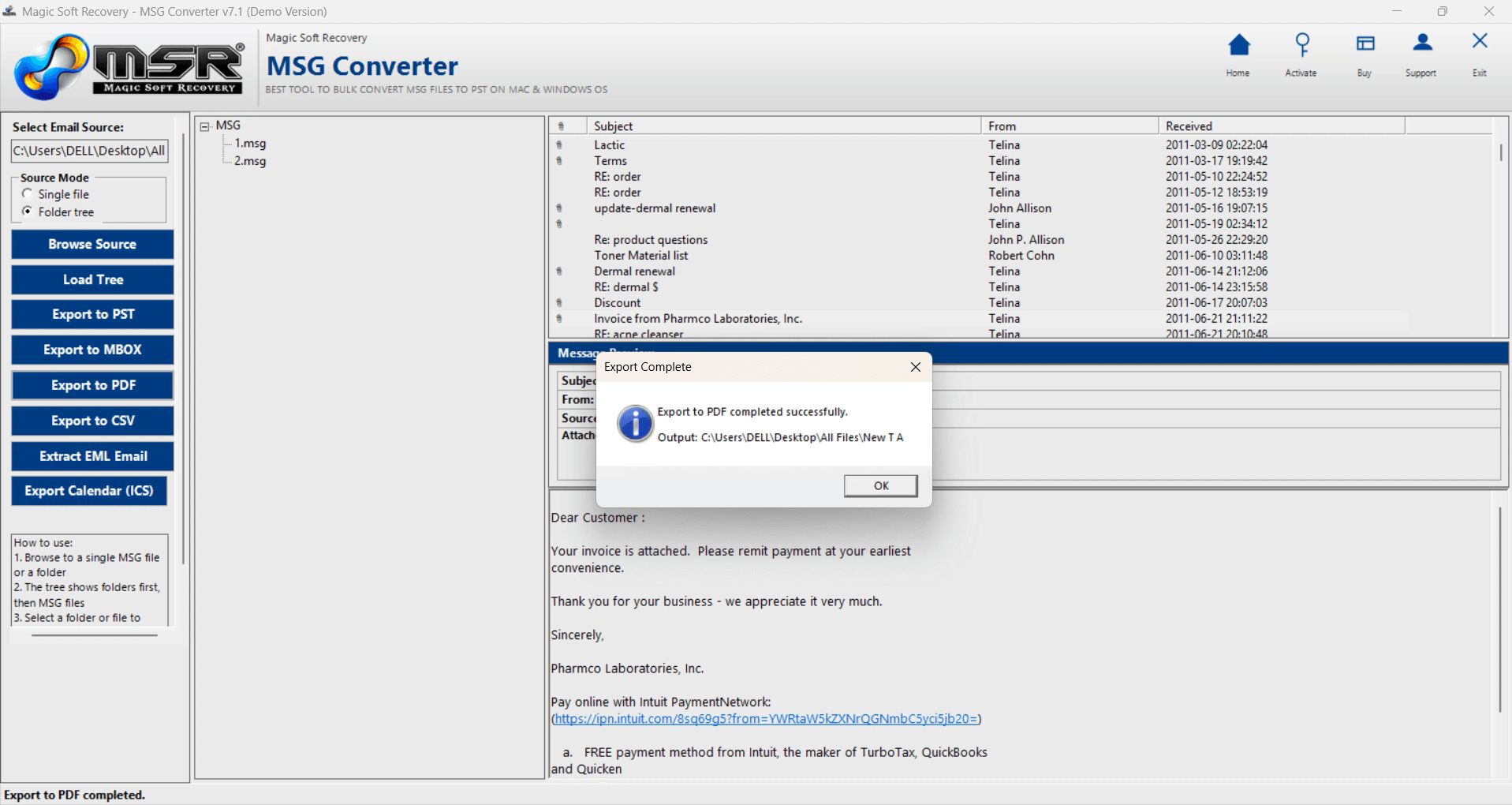
Please check Destination path for Ouput file.
Watch the complete installation process