Support
Batch Bates

How to Bates Number Multiple PDFs at Once

Written ByMagic Soft Recovery LLC
Published OnOct 28, 2026
Read Time4 Minutes

A document production is rarely one PDF. It's a folder of emails, contracts, scans and spreadsheets saved as PDF, and every page needs a number in the right order with no gaps or repeats.

Stamping files one by one invites mistakes. This guide shows how to plan a batch, run it, and keep a record you can rely on later.

01

Step 1: Plan before you stamp

  • Fix the order. Files are usually processed in name order. Rename them with a numeric prefix (001_, 002_) so the order is explicit.
  • Pick the start number. For a first production it's usually 1. For later volumes, it's the number after the last page of the previous one.
  • Agree the format. Prefix, padding (often 6 or 8 digits) and position. See format examples.
  • Collect passwords. Note which PDFs are protected and get their passwords before you start.
02

Step 2: Run the batch

Magic Soft PDF Bates Numbering handles folders of PDFs offline, with no limit on the number of files in the full version.

01

Add the folder

Click Add Folder or drag the files in. Tick Skip Encrypted / Password-Protected Files if you'd rather handle those separately.

02

Set the stamp

Enter the prefix, suffix, start number and step, and choose one of the six positions.

03

Add extras if needed

A confidentiality note, the production date or a QR code to your document portal can sit next to the number.

04

Preview

Check the stamp on real pages and turn on avoid-existing-text for documents with busy footers.

05

Process with a log

Turn on Generate audit log (CSV), leave Overwrite off, and start the batch.
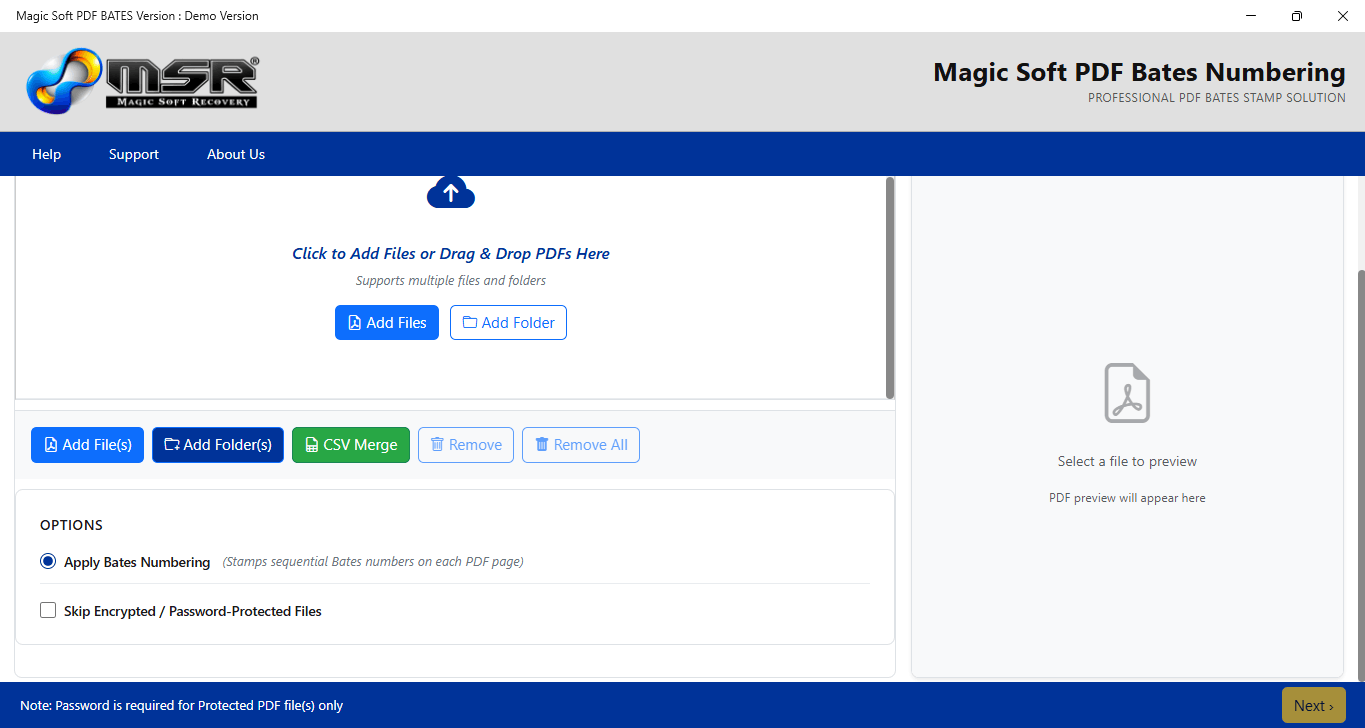
PDF Bates Numbering stamp settings with prefix, suffix and position
03

Step 3: Check the result

  • Open the CSV audit log and compare the file list against your folder.
  • Open the first and last file and confirm the numbers match what you expect.
  • Spot-check the change between two files to make sure the numbering runs on without a gap or a repeat. If your set needs strict continuity across files, confirm it in the preview and the log before producing.
  • Save the settings so the next volume uses exactly the same format.
Want one continuous file?

Merge the PDFs into one document first with PDF Split & Merge, then stamp it. One file means one unbroken run of numbers. See how to merge PDFs.

04

Numbering later volumes

Productions often come in waves. Keep a simple record for each volume: the volume name, the first and last Bates number, the date and the number of pages. When volume 2 arrives, start at the number after the last one in volume 1 and load your saved settings, so the prefix and format don't drift.

05

Mistakes that cause trouble later

  • Stamping the originals instead of copies.
  • Changing prefix or padding halfway through a matter.
  • Re-numbering pages that were already produced.
  • Covering text, signatures or existing stamps with the new number.
  • No record of which file holds which range.

Summary

Fix the file order, agree the format, run the whole folder in one batch with an audit log, and check the joins between files. New to Bates numbering? Start with what Bates numbering is.

Frequently Asked Questions

Frequently Asked Questions

Yes. Add the folder in Magic Soft PDF Bates Numbering and every PDF inside is processed in one run.

The full version has no file limit. The demo adds a watermark to the output.

Set the start number to the number after the last page of the previous production and reuse your saved settings.

A record of the files processed in the run, which you can keep for your own file or for whoever signs off the production.

Yes. Tick Skip Encrypted / Password-Protected Files and the rest of the batch carries on.

About The Author

Magic Soft

Magic Soft provides software solutions for email recovery, data migration, file conversion, and digital data management.

🏅
At Service Since 2015
10+ Years Experience
🌍
Trusted by Millions
Worldwide Customers
🔒
SSL Secure
256-bit Encryption
🛡️
McAfee SECURE
Site Security
🛡
DMCA Protection
Protected Content
✔
D-U-N-S Verify
Business Verified
⭐
BBB Verify
Trusted Business
🏅
At Service Since 2015
10+ Years Experience
🌍
Trusted by Millions
Worldwide Customers
🔒
SSL Secure
256-bit Encryption
🛡️
McAfee SECURE
Site Security
🛡
DMCA Protection
Protected Content
✔
D-U-N-S Verify
Business Verified
⭐
BBB Verify
Trusted Business